 Cocoatech
The Beginnings: A Small Frustration on a Macintosh Plus
The history of St. Clair Software goes back much further than Mac OS X. In the late 1980s, Jon Gotow was working on his master’s thesis, using a Macintosh Plus to write documents, create charts, and prepare diagrams. There was one thing about the Mac that drove him crazy: every time he opened or saved a file, the application would send him back to its own folder. He then had to navigate through the disk to find the folder containing his work, often repeating the same steps several times a day. And on a Macintosh Plus, navigating through folders wasn’t particularly fast!
Jon already knew something about Macintosh programming at that time and decided to fix the problem himself. He wrote a small system extension called DFaultD that could remember which folder an application should use when opening or saving files. The original utility did very little else. But it solved an everyday annoyance. As other people began using it, Jon added more functionality: recently used folders, favorite locations, and menus for moving between them. DFaultD eventually became Default Folder, distributed as shareware, with users paying a modest registration fee if they wanted to continue using it. By the 1990s, Default Folder had become a familiar utility to Mac users who regularly worked with documents.

Default Folder X: The Same Problem, a New Operating System
When Apple introduced Mac OS X in 2001, developers faced an enormous transition. The new operating system brought a different architecture, new programming technologies, and a redesigned interface.
For Default Folder, this meant adapting software that interacted directly with one of the most fundamental parts of the Macintosh interface: the windows that appear when you open or save a file. In February 2002, St. Clair Software introduced Default Folder X for Mac OS X. The first release supported applications using Carbon, Apple’s technology for helping older Mac software run on the new operating system. Support for applications built with the newer Cocoa framework followed in May of the same year. It was a significant technical step, allowing Default Folder to continue improving the familiar Open and Save dialogs in a completely new Mac environment.
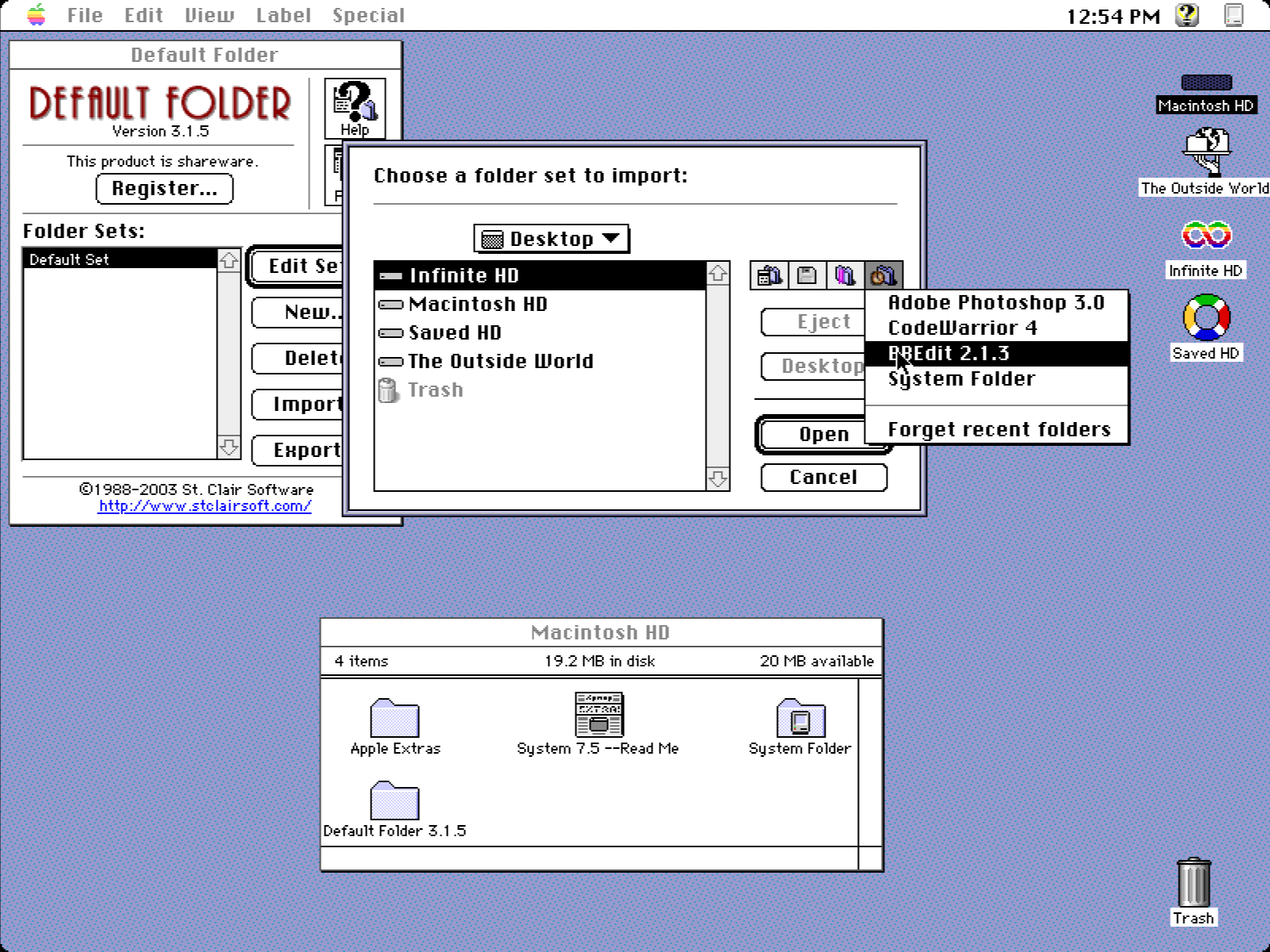
However even after releasing Default Folder X for Mac OS X in 2002, Jon continued maintaining the original Default Folder for classic Mac OS users. In April 2003, he released Default Folder 3.1.5, supporting systems dating back to System 7. The two versions coexisted as Mac users gradually moved from the classic operating system to Mac OS X. Many people still depended on older applications, and even Mac OS X provided a Classic environment to run them. Jon was maintaining software for both worlds at once. It’s a wonderful example of how independent Mac developers didn’t just survive Apple’s transitions: they helped their customers navigate them.
Over the years, the application has gained additional ways to search recent files, organize favorite folders, manage files directly from Open and Save dialogs, and connect with other Mac applications. Default Folder X 6, introduced in 2023, expanded its capabilities with Quick Search, redesigned drag-and-drop tools, improved folder navigation, and synchronization of settings and favorites between Macs. More recent versions continue adapting to Apple’s changes in macOS, including new security requirements and changes to the way applications display Open and Save dialogs.
And nearly forty years after Jon first became frustrated with saving his thesis, the central idea remains remarkably familiar: getting to the right folder shouldn’t be harder than working with the document itself. Interestingly enough the underlying problem hasn’t disappeared ever since: imagine you’re working on a project and regularly saving documents, images, and spreadsheets into the same folder. Every time you choose Save As, you may have to navigate through several folders before reaching the right location. Or perhaps the folder you need is already open in another window, but the application you’re using doesn’t take you there automatically. Default Folder X makes that process much easier: it remembers recently used folders, gives you quick access to favorite locations, and lets you jump to folders without navigating through the entire file structure.
You can even click on an open Finder window while using an Open or Save dialog, and Default Folder X will take you to that location.
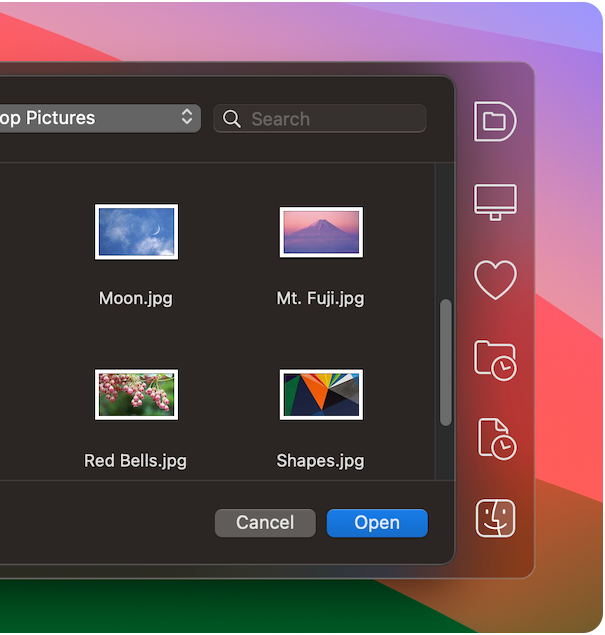
There’s also a small piece of shared history between Default Folder X and Path Finder: in February 2003, St. Clair Software released Default Folder X 1.6.6, adding explicit support for Path Finder. At the time, Path Finder was itself still a relatively young application, and both developers were working on ways to make file management more convenient on the new Mac OS X. This connection continued over the years: in March 2021, Default Folder X 5.5.7 introduced substantially expanded Path Finder integration. It could recognize folders in Path Finder’s open tabs, use those locations when navigating Open and Save dialogs, and add Default Folder X shortcut buttons directly to Path Finder’s toolbar. For people using both applications, this allowed them to work with the same folders across their file manager and the applications where they opened or saved documents.
Visit the St. Clair Software website
Jettison: Close Your MacBook and Go
In 2011, St. Clair Software introduced another utility aimed at a rather different everyday annoyance.
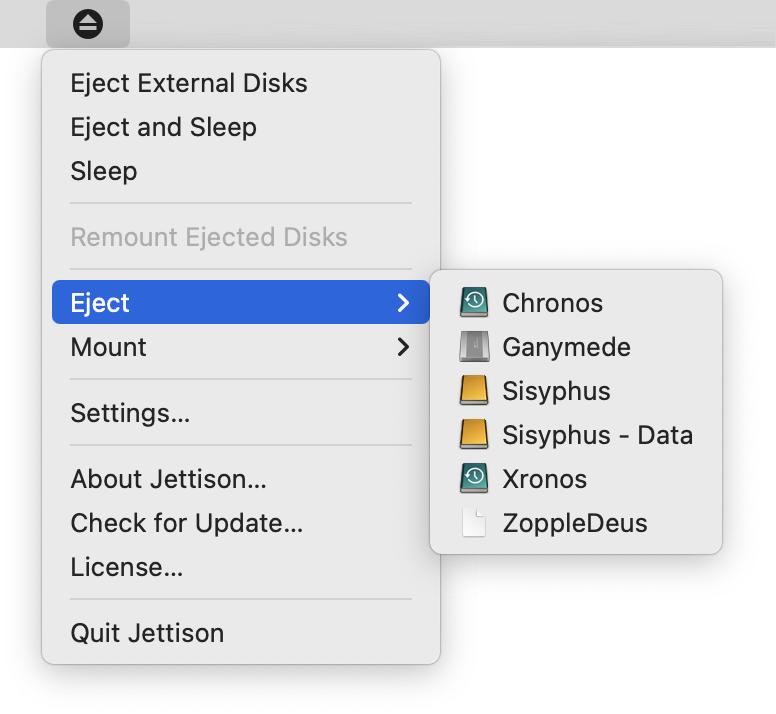
If you’ve ever used an external hard drive or USB drive with your Mac, you’ve probably seen the warning that a disk wasn’t ejected properly. Macs often continue writing information to external drives in the background. Disconnecting a drive without safely ejecting it can interrupt those operations and potentially damage files. But manually finding and ejecting every connected drive before closing a laptop isn’t always convenient. Jettison was designed to make that process easier: it can automatically eject external drives when your Mac goes to sleep and reconnect drives that are still attached when the computer wakes up.
Imagine you’re working with a MacBook connected to an external drive at your desk. You finish working, close the laptop, and want to take it with you. Instead of manually ejecting the drive first, Jettison can take care of that step as the computer goes to sleep. The application also provides a small menu-bar control for manually ejecting or reconnecting drives whenever you need to.
Over the years, Jettison has adapted to changing macOS storage systems, encrypted drives, Apple Silicon Macs, and new ways that applications interact with external disks.
Its 2026 releases continue to address practical problems such as drives that don’t eject successfully and applications that prevent disks from being disconnected. Like Default Folder X, Jettison addresses a small but familiar problem that can interrupt an otherwise straightforward task.
Visit the St. Clair Software website
More Ways to Make the Mac Easier to Use
St. Clair Software also develops several other utilities, each addressing a different part of everyday Mac use:
App Tamer helps prevent applications running in the background from unnecessarily consuming processor power and battery life.
HistoryHound searches the contents of websites you’ve previously visited or bookmarked. If you remember reading something online but can’t remember where, it can help you find the page again.
Go64 examines the applications installed on your Mac and helps identify older software that may need updating before you change macOS versions or move to newer hardware.
These applications may solve different problems, but they share a recognizable approach: finding the small frustrations in everyday computer use and building practical tools to make them disappear.
An Independent Developer’s Perspective
We asked Jon Gotow, the developer behind Default Folder X, to reflect on nearly forty years of building software for the Mac. What has changed most since the days of the Macintosh Plus, and what has remained the same?
Jon gave us a fascinating look at how the Mac, its users, and the world of independent software development evolved:
“We’ve come a long way in 40 years! Nearly everything about the Mac and its software has morphed over time, making life for indie software developers both exciting and challenging. Looking at different aspects of the software business, there have been huge changes:
Hardware: My current Mac has 50,000x more RAM and 18 CPUs each running 500x faster than my first Mac Plus. Software can do so much more – ideas that were inconceivable in 1986 are practical on today’s hardware. We can build way more cool stuff! But on the flip side, it raises the bar for small developers – users expect more and more complex capabilities even from solo developers.
macOS: Going from Classic Mac OS to Mac OS X, Apple added protected memory, filesystem permissions, increasingly restrictive privacy and security controls, and proscriptive APIs. As a developer in Classic Mac OS, there were so few constraints in the OS that you could write whatever you could imagine. The limit wasn’t what the OS would let you do, but whether the hardware could do it. Today, constraints imposed by the OS are often the limiting factor. While privacy and security controls and API limitations are absolutely necessary, they’re often a frustrating and time consuming part of developing an app. Sometimes I miss the “wild west” of Classic Mac OS.
Users: We’ve gone from Macs used by “enthusiasts” to folks viewing the Mac as an appliance. Customers used to keep up with every change to the system and every move Apple made; users today just want to get things done with a minimum of fuss. There are a lot more users, but the focus has tilted even farther towards making apps approachable and easy to use rather than loading them with features.
Marketing: It used to be that many Mac users read dedicated magazines like TidBITS, MacWorld, MacUser and MacAddict or specific online forums. News and reviews were concentrated within a handful of sources, making it easy for users to find information and for developers to get their app in front of people. Most of those venues are now gone, replaced by hundreds (or thousands?) of blogs, social media channels and websites. The market is much larger, but it’s more challenging to get noticed.
Goals: Through it all, one thing hasn’t changed: People want software to make their Macs more efficient, easier and more fun to use. Developers like me continue to look at their own Macs and your feedback for inspiration. More than ever, macOS is brimming with features and capabilities, and the joy and challenge every day is figuring out creative ways to make them easy to use.
Try apps from indie developers and give us feedback – we want to hear where we’re succeeding and where we can make our apps better!”
Jon’s reflections bring us back to something we’ve been thinking about while preparing this anniversary series: how much the independent Mac software community has changed.
There was a time when Mac users and developers gathered around the same magazines, forums, and websites. Today, there are more applications, more developers, and more people using Macs than ever, but it’s not always easy for them to discover one another.
That’s partly why we wanted to celebrate our 25th anniversary by introducing our readers to the people behind other longtime Mac applications. We hope these stories help a few more people discover software, developers, and ideas they might otherwise have missed.
And perhaps bring a little of that old Mac community spirit back along the way.
Celebrating Independent Mac Software
As Path Finder celebrates its 25th anniversary, we’re pleased to introduce our readers to another independent developer whose work actually predates Mac OS X by more than a decade.
Default Folder X and Path Finder have been helping Mac users work with files for almost the entire history of Apple’s modern operating system, and it’s particularly nice to look back at a connection between the two applications that began in 2003.
Subscribe to our newsletter to hear more: Black Friday is coming soon, and we’ll be sharing anniversary gifts and special offers from some of the developers featured in this series.
We hope you enjoy discovering the applications and the people behind them.