 Cocoatech
The Beginnings: A Tool Built for Software Testing
Long before SuperDuper! appeared, Dave Nanian had already spent many years developing software. In 1983, he co-founded UnderWare and helped create BRIEF, a programmer’s text editor, and, later, Track Record, a bug-tracking system.
In 2000, Dave founded Shirt Pocket, an independent Mac software company based in Massachusetts. Its first applications, netTunes and launchTunes, made it easier to control and share music between Macs running iTunes. But Shirt Pocket’s best-known application would emerge from a rather different kind of work.
In the early 2000s, Dave and another developer, Bruce Lacey, were both involved in testing software. Testing often meant repeatedly preparing computers with specific operating-system installations and software configurations. Bruce had written a small utility called Seed Volume Utility that helped make this process easier. Its copying engine was fast and reliable, and Dave saw that it could be useful for much more than software testing. He approached Bruce with a proposal: Bruce would concentrate on developing the copying technology, while Dave would redesign the interface, write the documentation, handle marketing and customer support, and help plan the product.
Remarkably, the two had never met in person when they agreed to work together.
Their collaboration became SuperDuper!, released in January 2004.

SuperDuper!: A Backup You Can Understand
Even if you have copies of your most important documents in your backup, getting everything back exactly the way it was before on a new setup can be a frustrating process. You may need to reinstall applications and recover all your settings, and maybe figure out along the way which files you’ve actually forgotten to save.
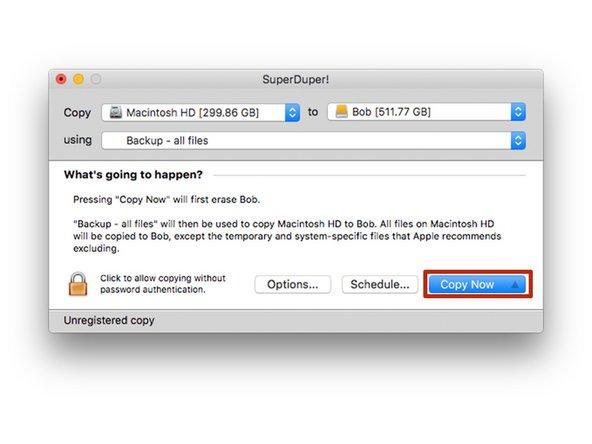
SuperDuper! was developed to make protecting and recovering a Mac considerably easier. Instead of asking users to understand complicated disk-copying commands, it presented a simple choice: select the disk you want to copy, select where the copy should go, and let the application handle the work. Importantly, SuperDuper! explained right away what was about to happen in ordinary language before beginning the operation. This was especially reassuring because creating a complete copy of a disk can involve erasing the destination drive. Users needed to understand exactly what they were asking the application to do.
Right from the beginning of its development SuperDuper! could create a complete copy of a Mac’s startup disk, including its operating system, applications, and files. On Macs that supported it, that copy could also be used to start the computer if the original disk failed.
Another unusual feature of the early application was called Sandbox. It allowed users to prepare a separate startup environment for trying potentially troublesome system updates or other changes, while keeping their personal files accessible. If the experiment went wrong, they could return to their original system. In 2005, when installing a major Mac OS X update could occasionally cause serious compatibility problems, this was a particularly useful precaution.
SuperDuper! received Macworld Eddy Awards in both 2005 and 2006, recognition that helped establish it among the best-known Mac backup utilities.
Making Backups Something You Actually Do
There is a difference between knowing that you should back up your computer and actually remembering to do it. 🙂 As SuperDuper! gained users, one of their most frequent requests was the ability to run backups automatically. Dave and Bruce wanted to add scheduling, but they were also determined to preserve the application’s simplicity.
In November 2005, SuperDuper! 2.0 introduced scheduled backups and improvements to its copying process. It also offered Smart Update, which made subsequent backups faster by copying changes rather than unnecessarily repeating all the work of a complete backup. This made a practical difference. Instead of spending time making a complete copy of a disk every evening, users could arrange for SuperDuper! to update an existing backup automatically.
When Apple introduced Time Machine with Mac OS X Leopard in 2007, Mac users gained another way to protect their files. But SuperDuper! continued to serve a different, complementary need: making complete copies of disks that could be useful for recovery, migration, or keeping a separate working copy of a system. The two approaches could work alongside one another. Time Machine made it convenient to recover earlier versions of individual files, while SuperDuper! focused on copying entire volumes.
A Changing Mac, a Changing Backup
Over the following years, backing up a Mac became technically much more complicated.
Apple moved from traditional hard drives to faster solid-state storage, introduced the APFS file system, and changed the way macOS protects its operating-system files. With Apple Silicon Macs, startup security and system-volume protection introduced further restrictions on how bootable backups could be created.
For backup applications, these changes were particularly demanding. A backup must not merely appear to contain the right files; it needs to preserve the information correctly and provide a dependable way to restore it. SuperDuper! continued adapting, even as changes to macOS placed new limits on what backup applications could do.
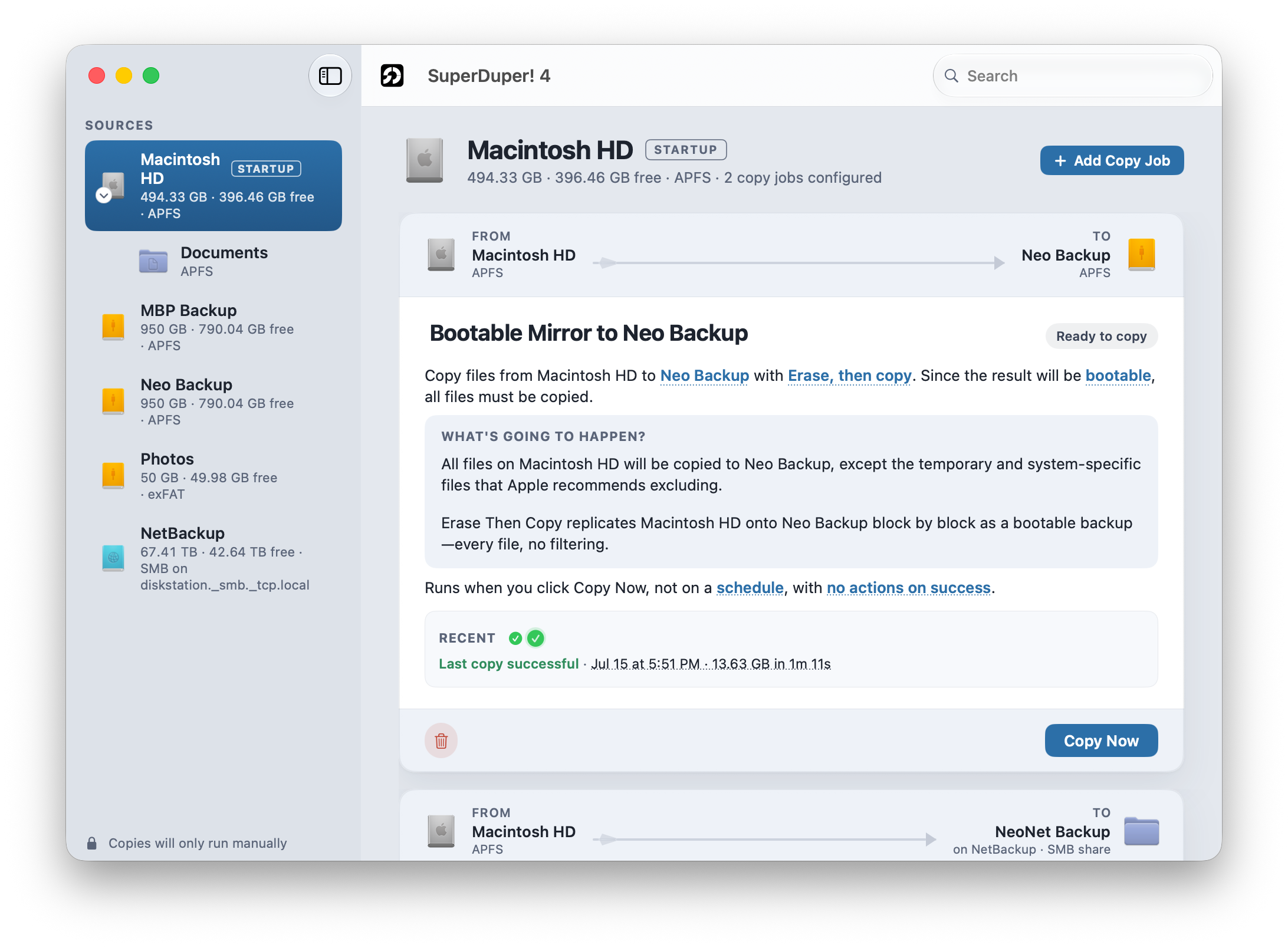
In 2026, Shirt Pocket introduced SuperDuper! 4, a complete rewrite of the application. The new version replaced the familiar interface with a redesigned approach that lets users configure copying operations by clicking options directly within a plain-English sentence. It also introduced a substantially faster copying system, including Turbo Smart Update, improved scheduling, clearer progress reporting, and better handling of modern storage technologies.
For someone creating a backup today, the principle remains familiar: tell the application what you want copied and where you want it, understand what will happen, and let the software handle the difficult parts.
Visit the Shirt Pocket website
An Independent Developer’s Perspective
We asked Dave Nanian, the developer behind SuperDuper!, to look back on more than two decades of Mac development. How has building a reliable backup application changed as macOS has evolved? And what has remained the same?
Here’s what Dave shared with us:
“I’ve got to say, it’s hard to believe it’s been 22 years since the original release of SuperDuper. There have been many, many changes in macOS over those years, and the challenge over that time has been to make the increased complexity of the copy operation as simple today as it was when first released.
SuperDuper 4 was a realization of a vision I had all those years ago, and despite its greatly increased capability (let alone its much faster operation), remains as simple and easy to understand as it was in 2004…while addressing the needs of today’s Mac user, including support of network drives, different drive formats, full background operation, and a modernized UI.
Over all those years, I’ve answered all of Shirt Pocket’s email myself—every question, support incident, and feature request—and it’s been really gratifying to be able to continue doing this for so long, and to interact with so many members of the Mac community. Thanks to each and every SuperDuper user, registered or not, for trusting us with your data.”
What stands out in Dave’s story is how much has changed in Mac backup technology, while his original goal has stayed the same: making backups easy to understand and use.
After 22 years of answering customer emails himself, Dave is still in direct contact with the people who rely on SuperDuper!. And there’s an interesting connection here to our previous article about Peter Lewis and Keyboard Maestro. Peter, too, has spent decades personally supporting his customers.
For Peter, those conversations helped him discover what needed improving in Keyboard Maestro. For Dave, they’ve been an important part of staying close to the people who trust SuperDuper! with their files.
Two very different applications, but a shared approach to independent Mac development: listening to the people who use your software.
Celebrating Independent Mac Software
As Path Finder celebrates its 25th anniversary, we’re pleased to introduce our readers to another independent Mac developer whose applications have accompanied Mac users through more than two decades of enormous technological change.
SuperDuper! began with a practical tool that made software testing easier. More than twenty years later, it continues helping people protect their files and recover from problems they hope they’ll never encounter.
Subscribe to our newsletter to hear more: Black Friday is coming soon, and we’ll be sharing anniversary gifts and special offers from some of the developers featured in this series.
We hope you enjoy discovering the applications and the people behind them.