 Cocoatech
Path Finder anniversary series
Twenty-five years ago, the Mac was a very different place. So was the community of independent developers building software for it. Some of us are still here. Over the years, we’ve watched macOS change, our customers grow more demanding, and the expectations placed on our software become greater than ever. We’ve rewritten things, reconsidered decisions, adapted to Apple’s changes, and kept going.
For Path Finder’s 25th anniversary, we’ve been introducing you to a few fellow independent developers who’ve been on this journey alongside us. Many of these applications started like Path Finder: because a developer wanted to solve a problem they had encountered themselves. A frustrating task, a missing capability, something that ought to have been easier. What began as a personal solution eventually became software that thousands of other Mac users found useful.
And perhaps that’s one of the things that makes independent Mac development so special.
Now, to conclude the series, we’d like to tell you a little of our own story.
A New Beginning: From SNAX to Path Finder
Steve Gehrman, founder of Cocoatech and original developer of Path Finder, grew up in Houston, Texas, and studied computer science at Texas Christian University in Fort Worth. His first experiments with programming came in high school, when a friend introduced him to a Texas Instruments TI-99/4 home computer. He tried a little BASIC, although he didn’t begin programming seriously until college.
At university, students worked with Unix on mainframe computers, but Steve was increasingly drawn to the graphical interface of the Macintosh. He thought it was the future of computing—and simply more fun to work with.
For his final college project, he built a Mac disk-compression utility, experimenting with different compression algorithms and learning to create a graphical interface. As Steve recalls today, the result was rather slow and didn’t compress files particularly well, at least in his opinion. But he learned a great deal—and earned an A!
After college, Steve pursued exactly the kind of work he’d hoped for: developing software for the Macintosh. He worked on Final Draft, a professional screenwriting application originally created for classic Mac OS in the early 1990s. Designed to handle the strict formatting requirements of film and television scripts, Final Draft became a widely used tool in Hollywood and later expanded to Windows. During this period, Steve also experimented with small Mac shareware utilities, mostly to try out new ideas and improve his programming skills.
By the late 1990s, Steve had moved on to an Internet startup called static.com. It was the height of the dot-com boom: thousands of technology companies attracted investors, hired developers, and expanded rapidly, often before they had found a sustainable business model. When the speculative bubble burst in 2000, many of those companies collapsed, and thousands of people working in the technology industry lost their jobs.
Steve was among those affected. Static.com ran out of funding and laid off employees, leaving him looking for work at a time when programming jobs were exceptionally hard to find. Rather than wait for the economy to recover, he decided to learn something new. Apple was preparing one of the biggest changes in Macintosh history: Mac OS X, a new operating system built on Unix, with a completely redesigned interface and new tools for developing applications. So one morning, Steve went to a local computer store and bought a blue Power Macintosh G3 tower, along with a CD-ROM containing a beta version of Apple’s new operating system.
He began exploring the development tools that would become known as Cocoa. To learn how they worked, he started building something practical: he needed a better way to navigate and manage files while programming, and the tools available at the time didn’t quite do what he wanted, so he began creating his own file manager.
He called it SNAX.
From SNAX to Path Finder
SNAX was initially a learning project, something Steve continued developing while looking for work. But as the application grew, it became clear that other Mac users wanted many of the same things.
When Mac OS X arrived in 2001, it was a major change for longtime Macintosh users. Apple had completely redesigned the interface, introducing the Dock, new window controls, and a very different Finder.
Not everyone was happy with those changes. Some familiar features were missing, and people who had spent years working with classic Mac OS had to get used to new ways of doing everyday tasks. Even the Trash had moved from the Desktop into the Dock.
SNAX combined familiar file-management behavior with new possibilities offered by Cocoa. Its first version was relatively simple, with List View as its only browsing mode, but it already provided additional tools for examining files, searching, and navigating folders.
One particularly useful feature was the Path Navigator, which displayed a file’s location in the folder hierarchy and made it easier to move between folders. It eventually inspired a new name for the application: Path Finder.
What began as a way for Steve to learn Cocoa programming had unexpectedly become a commercial product. Instead of finding another programming job, he had created one for himself.
And that was the beginning of Cocoatech.
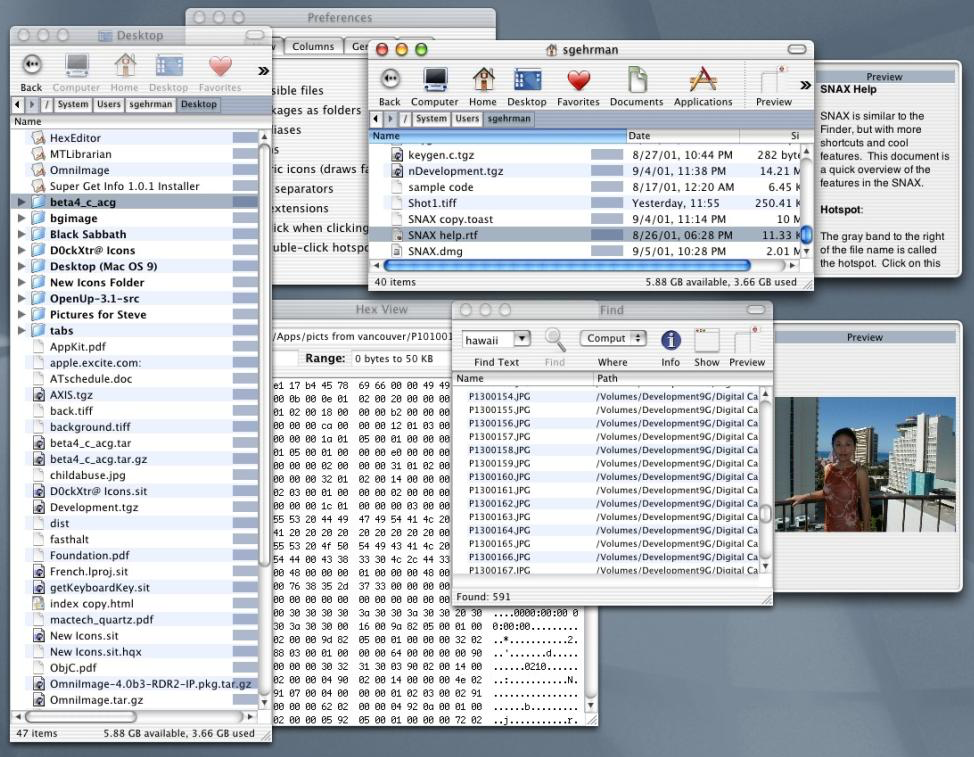
Two Paths Meet
Steve couldn’t have known it at the time, but another programmer was already on a journey that would eventually bring him to program Path Finder full time:
Dragan Milić first encountered a Sinclair ZX Spectrum at a friend’s house in 1983. At first, he just played a few games. But the following year, he began programming at a local computer club, initially in BASIC and soon afterward in assembly language.
He was fascinated by the strange, abbreviated commands of assembly language and the things it could do that BASIC couldn’t. Among his early experiments were small demonstrations and loading screens that appeared while games were loading from cassette tapes. They gave people something to watch while the computer was busy loading.
Dragan first encountered the Macintosh at university in 1994, just as Apple was moving from Motorola 68000-series processors to PowerPC. He couldn’t afford his own Mac at the time, but eventually bought a second-hand one. By 2002, he was using Mac OS X and Apple hardware exclusively.
He discovered Path Finder in early 2003 and began using it alongside Apple’s Finder.
Fast forward few years later, Dragan was developing Springy, his own Mac shareware application for working with compressed archives. Some of Springy’s right-click menu functions weren’t working properly with Path Finder, so he contacted Cocoatech to resolve the compatibility problems.
The discussions between Dragan and Steve led to another idea: could some of Springy’s archiving capabilities be brought into Path Finder? Dragan prepared a detailed proposal, but the project never went ahead. Then the two developers went their separate ways for a while.
Growing Alongside the Mac
Meanwhile, Path Finder continued evolving. Apple had improved the Finder considerably since the early days of SNAX, but there has always been a group of Mac users who wanted more control over how they work with files. Some preferred seeing two folders side by side rather than switching between windows. Others wanted detailed information about their files, easier ways to rename hundreds of items, or tools to compare folders before copying anything. And some simply wanted an interface they can arrange around their own working habits.
Over the years, Cocoatech listened to customers and kept adding capabilities in response to those needs: Path Finder developed dual-pane browsing, advanced file operations, customizable shortcuts, file previews, folder synchronization, alongside tools such as Drop Stack, which allows users to collect files from several locations before moving or copying them together.
As the application grew, so did the complexity of maintaining it. So around 2010, Steve contacted Dragan again. He was looking for a Cocoa programmer who could help develop Path Finder 6 and wondered whether Dragan knew anyone suitable. Dragan decided to try it himself.
For the first eleven months, Dragan worked on Path Finder alongside another job. In April 2011, developing Path Finder became his full-time occupation.
What began as a compatibility discussion between two independent Mac developers had turned into a long collaboration that would help shape Path Finder for the next fifteen years.
Path Finder 8: Making Room for More
Path Finder had to adapt to numerous changes to Apple’s API, moves from PowerPC to Intel and later to Apple Silicon, along with countless macOS releases, changing file systems, new security requirements, and changes to Apple’s development tools. Sometimes that meant rewriting parts of the application that had worked perfectly well for years.
One of the biggest changes, however, came from an idea Dragan wanted to pursue himself.
In Path Finder 7, users could display up to four Modules—small panels containing previews, file information, and other tools—in fixed areas beside and below the file browser.
But monitors were getting larger, and users wanted to make better use of the available space. They wanted more Modules and greater freedom to arrange them.
Dragan remembered seeing a modular interface in Windows software used for creating 3D game models. Why couldn’t Path Finder offer similar flexibility?
The idea was straightforward enough: let users arrange multiple Modules around the main file browser, choosing which tools and information they wanted to keep visible.
Making it work was another matter.
Apple’s SplitView technology, which controls how sections of an application window are divided and resized, wasn’t really designed for such a complicated arrangement. Dragan had to push it considerably further than its usual purpose.
Path Finder 8, released in 2018, introduced the new modular interface. It gave users much more control over their windows, but the implementation wasn’t without problems. Occasionally, the system would unexpectedly move a divider and disrupt a saved arrangement of Modules. It took several more years to resolve those issues.
Looking back, Dragan considers the modular system his proudest achievement in Path Finder. It was difficult, it didn’t work perfectly from the beginning, and he learned an enormous amount while improving it. But he’s glad he pursued the idea.

Twenty-Five Years and Still Evolving
Path Finder 26, released in 2026, marked another major modernization. Large parts of the underlying code were reworked, including significant changes to memory management. Important components such as Terminal, Sidebar, Preview, and Drop Stack were also rewritten.
The interface was refreshed for modern macOS, with improvements to browsing and Modules, alongside new capabilities including folder comparison and duplicate-file detection.
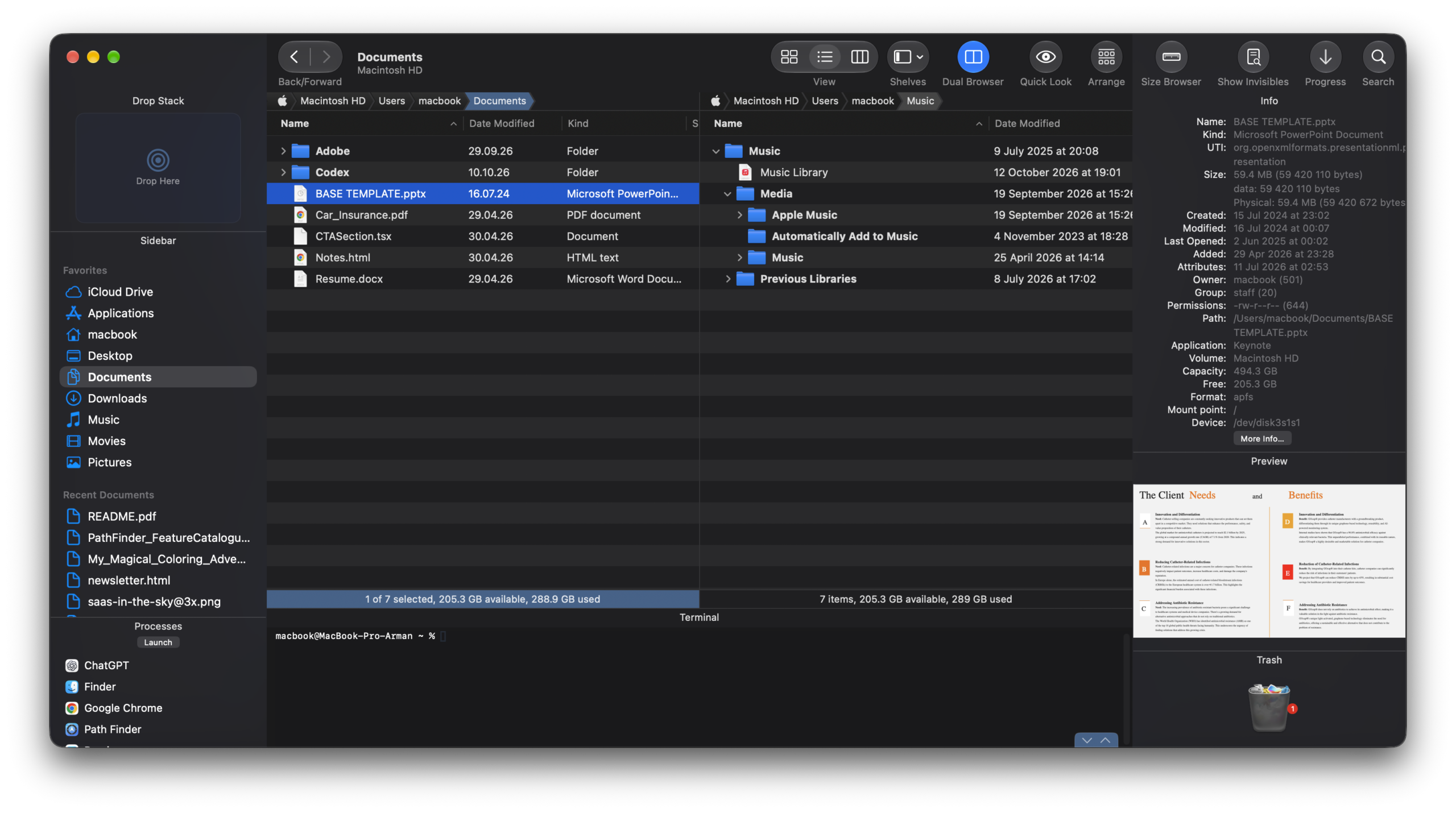
Path Finder looks considerably different from the little application Steve began developing twenty-five years ago.
But the original idea is still recognizable: giving people more control over how they work with files and letting them arrange the tools they need around their own habits.
Two Developers, Two Perspectives
We asked Steve and Dragan to reflect on their years developing software for the Mac:
“I remember the early days of Mac development as a particularly fun time. People were genuinely enthusiastic about software from small independent developers.
These days, we spend far too much time fighting macOS and its sometimes frustrating frameworks instead of actually developing software. And users seem to have lost some of that enthusiasm, too.
But who knows? Maybe I’m just getting older and grumpier! ”
“In the beginning it really felt like a big family. The programmers were all friends and we would meet up at WWDC. We could freely email Apple employees for help and advice and they were very friendly and responsive.
Mac users still very much pay attention to details and like well polished apps.”
Celebrating 25 Years
Twenty-five years after SNAX, we’re still developing Path Finder.
For our anniversary, we’ve also enjoyed looking back at the stories of five fellow independent Mac developers here on our blog. Some started long before us; others began around the same time. And they’re all still developing software today!
We’re grateful to everyone who has used Path Finder, helped us find bugs, suggested improvements, or simply stayed with us through the years. We’re glad to still be part of this community, and we’re looking forward to what comes next!
And of course, no birthday celebration is complete without presents! We’ve prepared a special anniversary offer for Path Finder, and our five developer guests have brought some lovely offers of their own.
Subscribe to our newsletter to join the celebration and discover what we’ve prepared for you!
We hope you’ll also take the opportunity to explore the applications and stories of the developers who joined us for this anniversary.